I Built a Free Synthesizer You Can Play Right in Your Browser
I spent about two weeks building a synthesizer that lives on this website. Not a plugin, not an app you download — you open the page and you’re already playing it. There’s no installer, no account, and no “buy the full version.” Just a circle, a keyboard, and sound.
I wanted to write down how it works and why I built it this way. Partly because a few people asked, and partly because I think the process is more interesting than the finished product on its own.
If you just want to try it: play the synth here →
What This Synth Actually Is
It’s a small instrument that runs entirely in your web browser, built with the Web Audio API. In other words, there’s nothing to install. It works on a phone, a tablet, or a laptop, and it sounds the same wherever you open it.
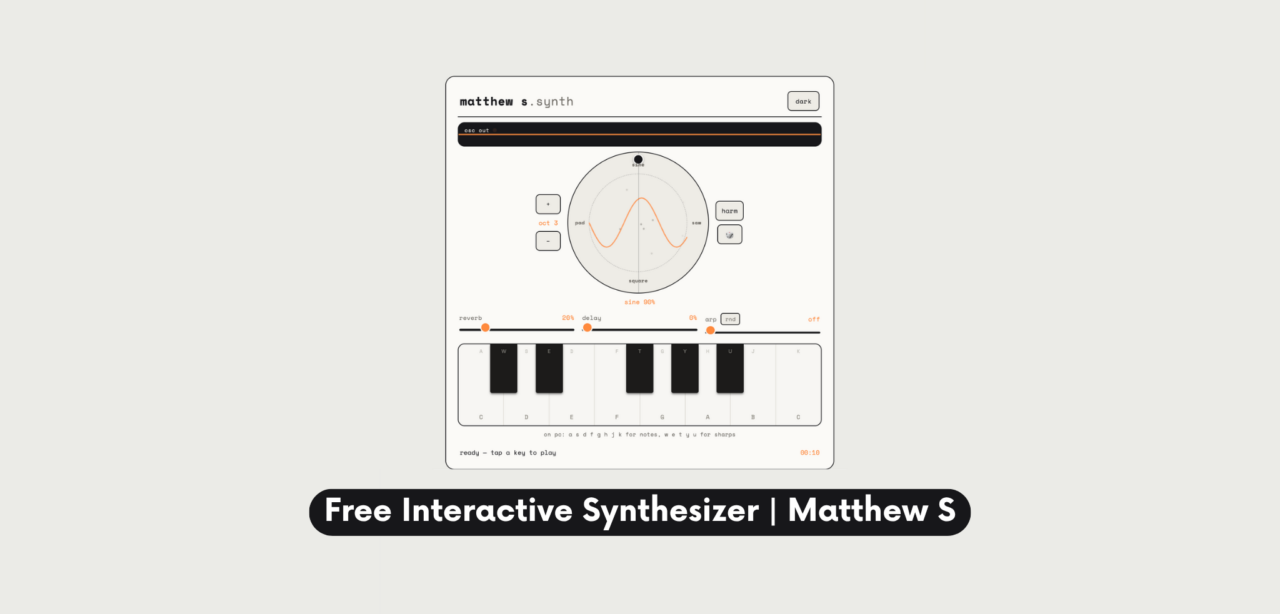
At the center is a circle. Four oscillators sit at its four points—sine, saw, square, and a soft pad sound. Wherever you touch inside that circle, you’re mixing between them live. Below it sits a real keyboard: white keys, black keys, and a full chromatic octave, not a row of colored buttons pretending to be a piano.
I designed it for two very different people at once: someone who’s never touched a synthesizer in their life and someone who has a studio full of them. On one hand, the first person can tap the circle and the keyboard and immediately make something that sounds intentional. On the other hand, the second person can hear, in about ten seconds, that the sound design underneath isn’t an afterthought.
Why I Built It
As a producer and sound designer, most of what I make lives inside a DAW, behind a screen most visitors to my site will never see. Because of that, I wanted something people could actually touch — not a video of me using gear, but the gear itself, simplified down to something anyone can pick up.
I’ve worked with brands like Erica Synths, Polyend, ROLI, and Gamechanger Audio over the years, and the thing that stuck with me from all of that is how much a good instrument teaches you through your hands, rather than through a manual. You move a knob, you hear what it does, and you understand it. So I wanted to bring a small piece of that feeling onto a web page.
There’s also a simpler reason, though: I like building things. This was as much a coding project as a sound design one, and along the way I learned a lot about the Web Audio API — most of it the hard way.
How It Works — The Wheel at the Center
Four Oscillators, One Circle
Instead of a dropdown menu where you pick “sine” or “saw” from a list, the four core waveforms sit at the top, right, bottom, and left of a circle. Every note you play triggers all four at once, but only the ones near where your finger is sit at any real volume. Drift right, and saw creeps in. Land between two corners, and you get an honest blend of both, not a crossfade that snaps from one to the other.
Actually, this is an old idea — synths like the Prophet VS and the Korg Wavestation used a version of it decades ago, usually called vector synthesis. I’ve always liked how physical it feels compared to turning a knob. Instead of selecting a preset, you’re standing somewhere inside a space of sounds.
Moving the Sound While a Note Rings
Here’s the part people seem to enjoy most: you can hold a note down and drag your finger around the circle while it’s still sounding, and the timbre shifts in real time. As a result, it’s the closest thing on this page to actually playing an instrument rather than clicking a button. On top of that, a short animated ripple spreads out from the middle of the circle every time you press a key, so the keyboard and the wheel feel like one object instead of two separate widgets bolted together.
Meanwhile, the accent color around the whole interface shifts too, leaning orange for sine, coral for saw, teal for square, and violet for the pad sound. It’s a small detail, but it means you can tell what you’re hearing just by glancing at the screen.
A Real Keyboard, Not Just Piano-App Buttons
Full Chromatic Range
Underneath the circle is an actual keyboard — white keys and black keys, laid out the way a real piano is, spanning a full octave with every semitone available. Even so, I didn’t want to limit anyone to a pentatonic scale just to make it foolproof. If you know what a C major chord is, you can play one. And if you don’t, you can still just explore and it’ll sound good, because the sound design underneath is forgiving.
Play It From a Computer Keyboard Too
If you’re on a laptop, though, the letters A S D F G H J K play the white keys, and W E T Y U play the black keys above them. That’s the same layout used in a lot of music software, so if you’ve ever used GarageBand’s typing keyboard, your fingers already know where to go.
Shaping the Sound: Delay, Reverb, and an Arpeggiator
Three small sliders sit below the wheel:
- Delay — adds a rhythmic echo behind what you play, which turns even a single held note into something more textured.
- Reverb — pushes the sound back into a room, from dry and close to wide and distant.
- Arp — turns your held notes into an arpeggio, with an option to have it pick notes randomly instead of in sequence, which is genuinely fun to leave on while you experiment with the wheel.
Importantly, none of these are hidden three levels deep in a menu. They’re right there, and moving them changes what you hear immediately.
Small Details That Make It Feel Alive
A few things I added mostly because they made the instrument more satisfying to sit with:
- Chord recognition. Hold three notes that form a real chord — a major, a minor, a sus4 — and the name of that chord quietly appears on screen. It’s a small thing, but it turns “I pressed some keys” into “I played a C minor,” which matters more than it sounds like it should.
- Harmony mode. Turn it on, and every single note you press automatically gets a third and a fifth stacked on top of it. In short: one finger, a full chord. It’s the fastest way to make the instrument sound good if you don’t play anything by ear.
- A random button. One tap reshuffles the oscillator blend, the arpeggiator, and the sound character all at once — essentially a “surprise me” button for when you don’t know where to start.
- A light and dark mode, simply because I wanted the tool to sit comfortably on the page regardless of what time someone’s browsing.
Built to Be Light and Fast
To begin with, none of this uses samples, recordings, or anything that has to be downloaded before you can play. Instead, every sound is generated live by your browser using oscillators and a handful of audio effects, so the whole thing loads in a couple of seconds even on a slow connection. Consequently, there’s no backend, no server processing your audio, and nothing about what you play ever leaves your device.
It’s designed as an interactive toy and a demonstration of sound design, not a production tool you’d route audio out of. If you’re looking for production gear recommendations, I write about that separately on the blog.
Also, I built it to work as well on a mid-range phone as it does on a laptop, which meant a lot of testing on the smallest screen I own, and rewriting things more than once when they felt sluggish on a touchscreen.
Try It Yourself
It’s live on the site now, free, with nothing to sign up for.
If you make something you like, or you build a sound you think is worth sharing, I’d genuinely like to hear about it — reach out on Instagram or through the contact page.
Frequently Asked Questions
Yes. There’s no account, no trial period, and no paid version hiding behind it. It’s free to play, on any device, for as long as it’s on the site.
No. It runs entirely in your web browser using the Web Audio API. Nothing gets installed on your device, and nothing is saved or uploaded anywhere.
Yes. It’s built to be played by touch, and it supports multiple fingers at once, so you can hold a chord with one hand and touch the wheel with the other.
Any modern browser — Chrome, Safari, Firefox, or Edge — on desktop or mobile. Safari on iOS is fully supported, including on iPad.
Yes. The letters A through K play the white keys, and W, E, T, Y, U play the black keys above them, the same layout used in many virtual keyboard apps.
It blends four different oscillator waveforms — sine, saw, square, and a soft pad tone — based on where you touch inside it. It’s a form of vector synthesis, an older technique from hardware synths like the Prophet VS, adapted for touch.
Not at the moment. It’s built as a playable instrument for the moment you’re on the page, not a recorder or a DAW.
It’s designed as an interactive toy and a demonstration of sound design, not a production tool you’d route audio out of. If you’re looking for production gear recommendations, I write about that separately on the blog.
No Comments