Hi, I’m Matthew S , an Italian electronic music producer, DJ, sound designer and music educator.
Throughout my career, harmonic mixing has become one of the most valuable techniques in both my DJ performances and studio workflow. Understanding musical key doesn’t just make transitions smoother; it helps tell a story, control energy and create a more immersive listening experience.
In this guide, I’ll share my experience with the Camelot Wheel, explain how Mixed In Key fits into a professional DJ workflow, and show you practical techniques that can help improve your mixes, whether you’re just starting out or already performing professionally. Whether you’re preparing your first DJ set or performing on festival stages, there’s one technique that can instantly make your transitions sound more musical and professional: harmonic mixing.
For years, DJs relied only on BPM matching to create smooth transitions. While beatmatching remains essential, harmonic compatibility between tracks is what often separates a technically correct mix from one that feels truly emotional and immersive.
This is exactly where the Camelot Wheel comes into play.
Combined with software like Mixed In Key, it allows DJs and producers to organize their libraries by musical key, making harmonic transitions faster, more intuitive, and incredibly effective.
In this guide, I’ll explain what the Camelot Wheel is, how harmonic mixing works, how to use Mixed In Key alongside Rekordbox, Serato DJ Pro, Traktor and VirtualDJ, and why understanding musical key has become one of the most valuable skills for modern DJs and electronic music producers.
What Is the Camelot Wheel?
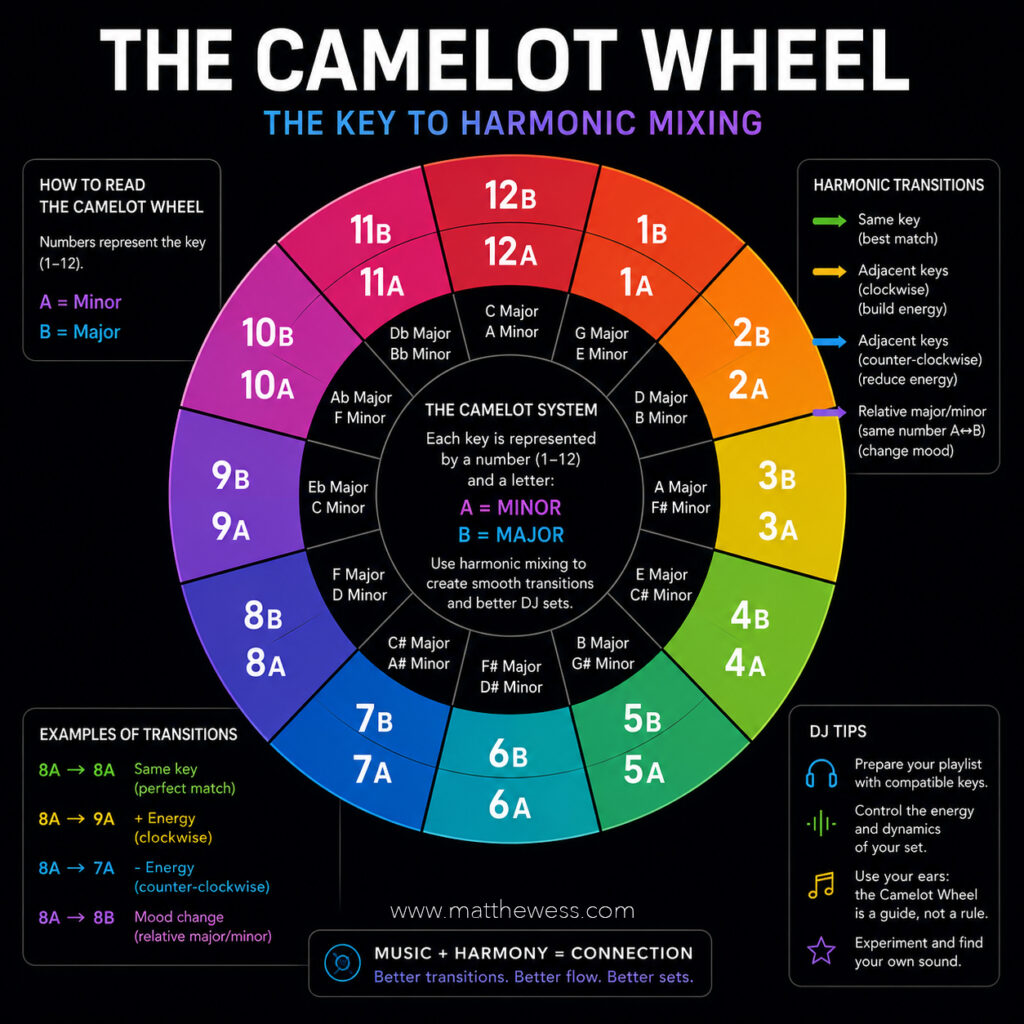
The Camelot Wheel is a simplified representation of the traditional circle of fifths, specifically designed for DJs.
Instead of requiring knowledge of music theory, it replaces standard key names with an easy-to-read numbering system.
Each musical key is assigned:
- A number from 1 to 12
- A letter:
- A = Minor
- B = Major
For example:
- 8A = A Minor
- 8B = C Major
- 9A = E Minor
- 9B = G Major
This intuitive layout makes it incredibly easy to identify compatible keys during a live performance.
Instead of thinking about scales and intervals, DJs simply follow adjacent numbers and matching letters.
It’s one of the reasons why harmonic mixing has become accessible to DJs of every skill level.
What Is Harmonic Mixing?
Harmonic Mixing is the practice of mixing tracks that share compatible musical keys.
When two songs are harmonically related, melodies, basslines, chords and vocals naturally blend together.
Instead of hearing musical tension or dissonance, listeners experience a transition that feels almost invisible.
The result is:
- smoother blends
- cleaner mashups
- more emotional storytelling
- longer transitions
- greater musical coherence
For genres like:
- Melodic Techno
- House
- Progressive House
- Deep House
- Trance
- Organic House
- Electronica
- Ambient
harmonic compatibility often becomes just as important as BPM.
Why Musical Key Matters
Imagine mixing two tracks with identical BPM.
Rhythmically they fit perfectly.
Musically they might completely clash.
The bass note of one track may conflict with the chords of another.
Vocals may sound off-key.
Lead synths can suddenly create unwanted tension.
This doesn’t necessarily mean the mix is “wrong.”
Sometimes tension is exactly what you want.
However, when your goal is creating a smooth, immersive journey, harmonic compatibility becomes incredibly valuable.
That’s why so many professional DJs analyze their entire music library before every performance.
Understanding the Camelot Wheel
The Camelot Wheel works because neighboring keys share most of their musical notes.
The simplest harmonic transitions are:
Same Key
Example:
8A → 8A
This creates the smoothest possible transition.
Ideal for:
- long blends
- atmospheric mixes
- vocal transitions
- progressive builds
One Step Clockwise
Example:
8A → 9A
A subtle increase in musical tension while remaining harmonically compatible.
Perfect when gradually building energy during a DJ set.
One Step Counterclockwise
Example:
8A → 7A
This slightly relaxes the harmonic movement while maintaining compatibility.
Useful when reducing intensity without making the transition feel abrupt.
Relative Major / Minor
Example:
8A → 8B
Minor and major versions of the same Camelot number share many notes.
This creates emotional contrast while preserving musical balance.
One of my favorite techniques during melodic breakdowns.
Advanced Energy Control Through Key Changes
One of the most overlooked aspects of harmonic mixing is energy management.
The Camelot Wheel isn’t just about avoiding clashing notes.
It’s also a powerful storytelling tool.
Increase Energy
Examples:
8A → 9A
9A → 10A
10A → 11A
Moving clockwise often creates a subtle sense of forward momentum.
Listeners rarely notice the theory behind it.
They simply feel the set becoming more exciting.
Reduce Energy
Examples:
8A → 7A
7A → 6A
This approach works beautifully during warm-up sets or after an intense peak-time section.
Emotional Shift
Example:
8A → 8B
Switching from minor to major can completely transform the emotional atmosphere.
Minor keys often feel darker, deeper or more introspective.
Major keys generally introduce brightness and optimism.
Used correctly, this simple move can completely change the mood of a dancefloor.
What Is Mixed In Key?
Mixed In Key is one of the most respected music analysis tools available today.
Instead of relying exclusively on DJ software to detect musical key, Mixed In Key uses a dedicated analysis engine developed specifically for harmonic mixing.
It analyzes:
- musical key
- energy level
- cue points
- tempo
- musical characteristics
After analysis, the software writes the information directly into your music files.
This allows your DJ software to display key information automatically.
For many professionals, Mixed In Key remains one of the most accurate key detection solutions currently available.
Using Mixed In Key with Rekordbox
Many DJs prepare playlists inside Rekordbox before exporting them to USB drives.
A common workflow is:
- Analyze tracks in Mixed In Key.
- Save Camelot values into metadata.
- Import the library into Rekordbox.
- Sort playlists by key.
- Build harmonic playlists.
This significantly speeds up preparation before gigs.
Instead of searching randomly, compatible tracks become immediately visible.
Using Mixed In Key with Serato DJ Pro
Serato users benefit from exactly the same workflow.
Once analysis is complete, Camelot values appear alongside BPM information.
This makes live browsing much easier.
During performance, it’s simple to locate tracks sharing:
- identical key
- neighboring key
- relative major/minor
Without interrupting creativity.
Harmonic Mixing in Traktor
Native Instruments Traktor already offers key detection.
However, many performers still prefer analyzing their libraries with Mixed In Key because of its reputation for excellent accuracy.
Inside Traktor you can:
- filter tracks by key
- sort playlists
- prepare harmonic playlists
- build longer musical journeys
Especially useful for extended club sets.
Mixed In Key with VirtualDJ
VirtualDJ has become incredibly powerful over recent years.
When paired with Mixed In Key, users gain an additional layer of confidence during performance.
Displaying Camelot values directly inside the browser makes harmonic decisions almost instantaneous.
This is particularly useful during open-format performances where genres change frequently.
Harmonic Mixing in Music Production
The Camelot Wheel isn’t only for DJs.
As a producer, I often use harmonic principles when:
- testing arrangements
- selecting vocal samples
- layering synths
- creating mashups
- preparing live performances
- building hybrid DJ/live sets
Knowing the musical key speeds up creative decisions.
Instead of experimenting blindly, I immediately understand which ideas are likely to work together.
That doesn’t replace creativity.
It simply removes unnecessary friction from the creative process.
Professional DJ Tips
After years of performing, producing electronic music and preparing DJ sets, I’ve learned that harmonic mixing is incredibly powerful—but it should never become a rigid rulebook.
Here are a few principles I personally follow.
Use the Camelot Wheel as a Guide
The wheel is an excellent roadmap.
It helps reduce mistakes.
But music isn’t mathematics.
Sometimes an “incorrect” transition creates exactly the emotional impact you’re looking for.
Trust Your Ears
Analysis software is extremely accurate today.
Still, your ears remain the final judge.
Always preview transitions.
Some tracks technically share the same key but still don’t blend perfectly because of arrangement, sound design or vocal content.
Consider Energy Before Theory
A perfectly harmonic transition that kills momentum isn’t necessarily a good transition.
Sometimes choosing the right groove matters more than choosing the perfect key.
Dancefloors respond to emotion—not spreadsheets.
Experiment Beyond the Rules
Once you’re comfortable with harmonic mixing, start intentionally breaking the rules.
Unexpected modulations can create tension before an explosive drop.
Creative DJs know when to follow theory—and when to ignore it.
Organize Your Library
One of the biggest workflow improvements comes from preparation.
A properly tagged music library saves countless hours before performances.
The more organized your collection becomes, the more spontaneous your creativity can be during a live set.
Common Mistakes to Avoid
Many DJs become so focused on harmonic compatibility that they forget other equally important elements.
Avoid these mistakes:
- ignoring phrasing
- forcing harmonic transitions between incompatible grooves
- relying exclusively on software analysis
- neglecting EQ during transitions
- forgetting crowd energy
- assuming every analyzed key is absolutely correct
Remember: technology supports your creativity—it doesn’t replace it.
Final Thoughts
Since I started incorporating harmonic mixing into both my DJ performances and music production workflow, I’ve noticed a significant improvement in the way I build musical journeys.
Preparing playlists became faster.
Transitions became more fluid.
Mashups sounded more natural.
Most importantly, I found myself focusing less on technical decisions during performances and more on reading the audience.
That’s what harmonic mixing should ultimately do.
The Camelot Wheel and Mixed In Key don’t make creative decisions for you.
Instead, they remove unnecessary obstacles, allowing you to stay connected with the music and the people in front of you.
In my experience, the Camelot Wheel is one of the best learning tools available for DJs. It simplifies music theory without oversimplifying creativity.
And while I always recommend learning how it works, I also believe one thing above everything else:Your ears will always be the most powerful tool in your DJ booth.
Frequently Asked Questions (FAQ)
What is the Camelot Wheel?
The Camelot Wheel is a simplified system that helps DJs perform harmonic mixing by organizing musical keys into an easy-to-use numerical format.
What is Harmonic Mixing?
Harmonic Mixing is the technique of mixing songs with compatible musical keys to create smoother, more musical transitions.
Is Mixed In Key better than built-in DJ software key detection?
Many DJs consider Mixed In Key one of the most accurate key analysis tools available, making it a popular choice alongside Rekordbox, Serato DJ Pro, Traktor and VirtualDJ.
Can beginners use the Camelot Wheel?
Absolutely. The Camelot Wheel was specifically designed to make harmonic mixing accessible without requiring advanced music theory knowledge.
Does harmonic mixing work for every music genre?
Yes. While it’s especially valuable in electronic music, harmonic mixing can improve transitions in virtually any genre, including pop, hip-hop, house, techno, trance, drum & bass and open-format DJ sets.
Should I always follow the Camelot Wheel?
No. The Camelot Wheel is a powerful guide, but it should never limit your creativity. Experienced DJs often break harmonic rules intentionally to create tension, surprise and emotional impact. Trust your ears and let the dancefloor be your final reference.